
Legal Arena
Loading your page…
Legal Arena
Loading your page…
Search titles and the full guide, including collapsed sections.
Legal Arena · Game guide
One client, a disputed story and a firm with bills to pay. Ask the questions, choose your strategy and build a practice shaped by your decisions.
Lawyer Mode
Find clients, investigate disputes, negotiate a deal or argue in court. Earn fees, build your reputation and decide when to invest in your office and team.
Start with your first client →Judge Mode
Hear conflicting accounts, question both sides and keep order. Make the difficult judgment, explain your reasons and develop your judicial career.
Take the bench →You can learn as you play. Start with one case; come back when a new decision catches your interest. The details are here when you need them.
Use Search help topics above to find a control or rule anywhere in the guide, including collapsed sections. Select a result to open the matching section.
Copy the entire guide as Markdown, including collapsed sections and screenshot links.
Getting Started
Take your first client from a disputed story to a result. Or take the bench.
You begin with a small law firm, a free Community workspace and starting funds. A prospective client brings you a problem and their version of events. You decide whether to take them on, what to charge and how to pursue their case.
Play one matter through to its result. You can discover the rest of the career as your firm grows. Browse the enquiry inbox to find a problem that draws you in. If you need case access, choosing Review enquiry opens the purchase options immediately, before the email consultation opens.
You can pause and return through Your matters. If you prefer to learn by exploring the screen, the Practice tour will show you around.
You can browse the inbox before buying access. After your eligible free case is used, Review enquiry and Continue email thread require Unlimited access, an available case credit or an active free-access offer. Without access, the purchase options open immediately on that click; the consultation stays unopened. Your existing case records remain available.
Opening an enquiry does not spend a case credit or start representation. Accepting the agreement uses your applicable case entitlement, with access checked again before the case starts. Purchased access is separate from your firm's fictional funds, which have no cash value. Choosing pro bono waives the client's legal fee; it does not waive the game's access requirement.
The enquiry's Case access disclosure tells you whether accepting will use your eligible free lawyer case, one previously purchased case credit or active Unlimited access.
Your signed engagement sets the fee and when it is earned. For foreign work, also review the travel or remote support costs, any agreed client expense advance and your cash needed upfront. Clients and legal fees explains each arrangement.
Want to face another player? Player challenges give you an opponent on the other side of the same dispute. Or take the bench and decide the case yourself.
You have a client. Now find out what you can do for them. A well-aimed question can uncover a useful date, expose a weak assumption or point you toward a record worth finding. Follow the answers, test your theory and decide when you have enough to make your move.
Build your case through the client interview
Open full size ↗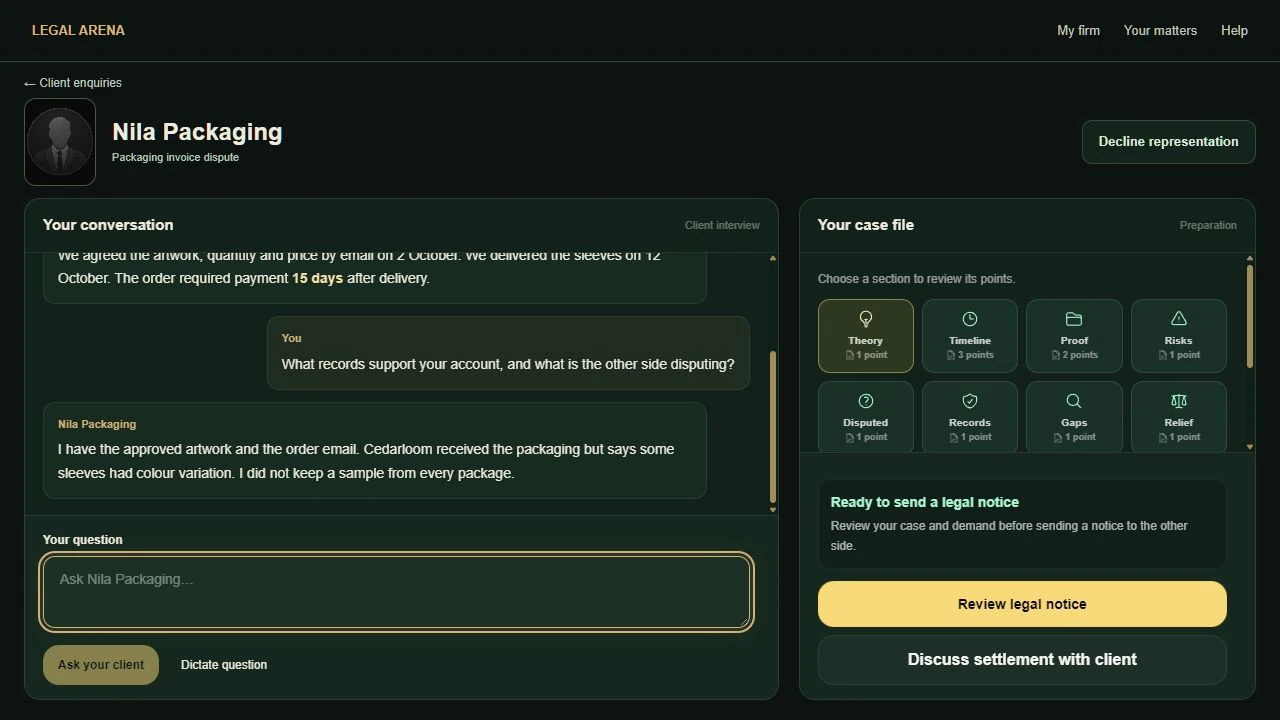
A legal notice puts your demand on the table before court. Use Auto-draft legal notice to start from the client's requested outcome and your case notes. Or write or dictate your instructions in your own words, then choose Draft formal notice to turn that text into formal correspondence. Review the wording, amounts and conditions before sending.
Review the notice before sending
Open full size ↗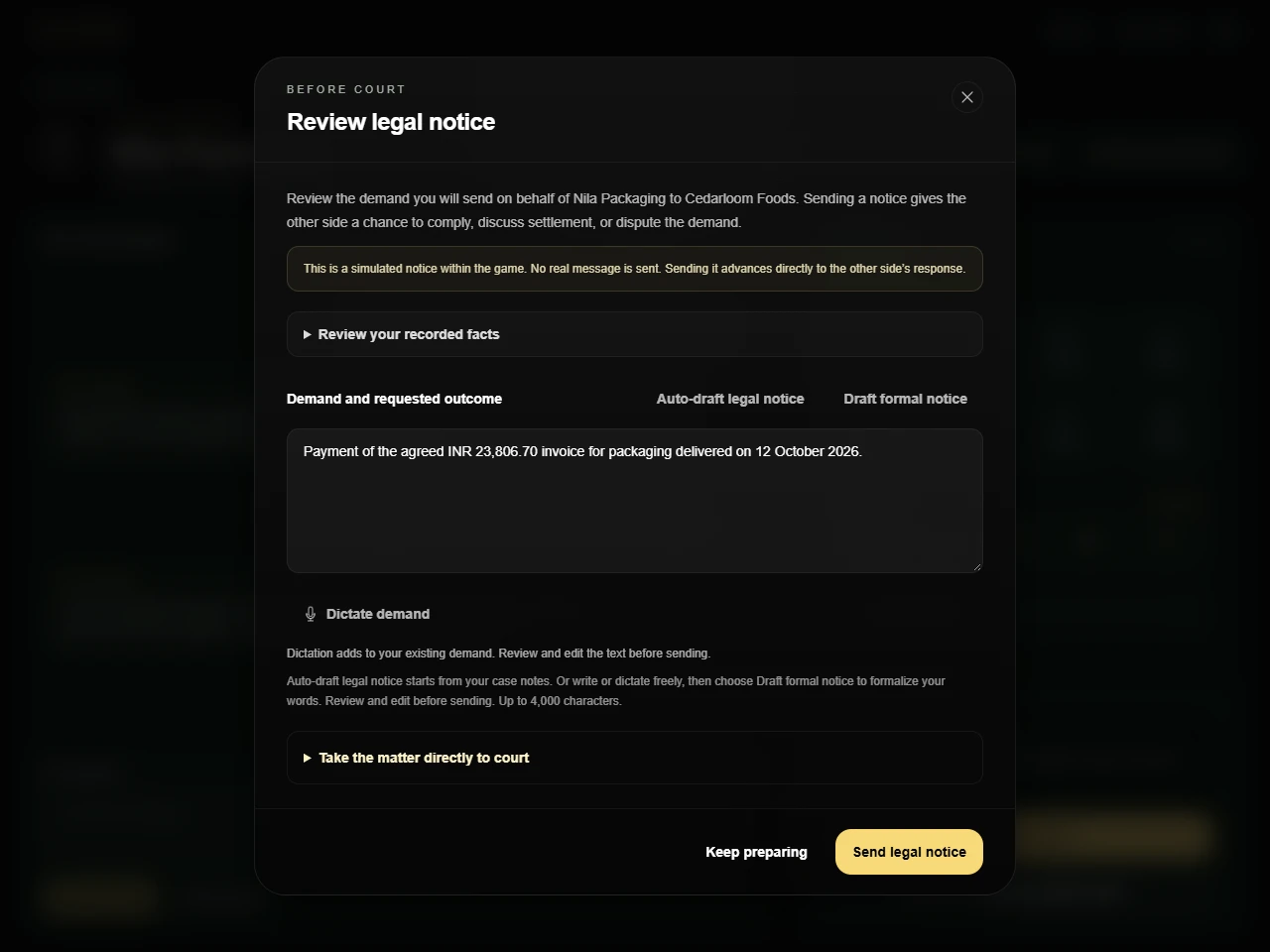
Sending a notice advances straight to the simulated response in the same modal. Full compliance also stays open for you to read before you dismiss it. If the other side meets the demand, the matter closes and your client leaves happy. If they want settlement, you can negotiate. If they dispute it or stay silent, decide whether more preparation, a deal or court gives your client the best chance.
Theory connects the facts to your claim or defense. Timeline keeps the sequence clear. Proof and Records identify support; Disputed, Risks and Gaps show points to test. Relief records your client's requested outcome.
Select a card to inspect its points in the Case file reference panel, then close the panel to return to the interview. In the office interview, Your case file sits beside the conversation on a wide screen and below it on a phone. Use the case actions to research, review records or involve your team where available.
Suggested questions fill Your question without sending. Edit the wording or write your own, then choose Ask your client. You can also use Dictate question and Stop recording to add a transcribed question for review. Intake tour in the interview header is available if you want a walkthrough; closing the tour returns you to your draft.
Distinguish an assertion from evidence. An admission by the other side may establish a fact without a separate document; putting an unsupported allegation in your notes does not prove it. The current success chance is an estimate, and the courtroom run keeps its recorded starting assessment.
The interview opens for reading. Tap Your question when you want to type. After you send, the keyboard closes and the client's reply comes into view. Selecting a suggested question or Ask another question brings the draft into view without opening the keyboard.
You can scroll back through the conversation to reread earlier answers. If an exchange was interrupted, use Finish updating notes when offered. Show full reply reveals the rest of an answer that is still appearing.
For voice input, choose Dictate demand, allow microphone access, then use Stop & transcribe. Dictation adds to the text already in the box. Use Cancel dictation to stop recording or transcription. Review the added words before formalizing or sending the demand.
Drafting formal notice… shows that your text is being prepared. Recording, transcription and drafting temporarily disable sending and draft replacement. If formal drafting fails, your original text stays in the box; read the error and choose Draft formal notice again to retry.
Reopen a sent notice through Review notice response. To proceed to court, review the Court claim, choose the client's original outcome or your notice demand, confirm that you have consulted your client, then select Proceed to court. The unsent review also has Take the matter directly to court if you choose to sue without a notice.
Keep the demand grounded in the case record and the outcome your client has requested.
Leave and return through Your matters to resume saved work. Choosing the case's exit, decline or quit action is a decision to end it; read its confirmation and recorded consequences.
If you decline during intake, explain the decision and review the terms. An unearned retainer is returned; an already earned preparation retainer remains earned. Withdrawal does not earn the unpaid completion fee. You can seek another client afterward. Leaving an active player challenge records an incomplete withdrawal.
You can solve a case across the table. Find out what your client values, work out what the other side will move on and turn that overlap into terms you can accept. Sometimes certainty is worth a compromise. Sometimes the offered deal leaves court looking better. You decide.
A private huddle beside the negotiation
Open full size ↗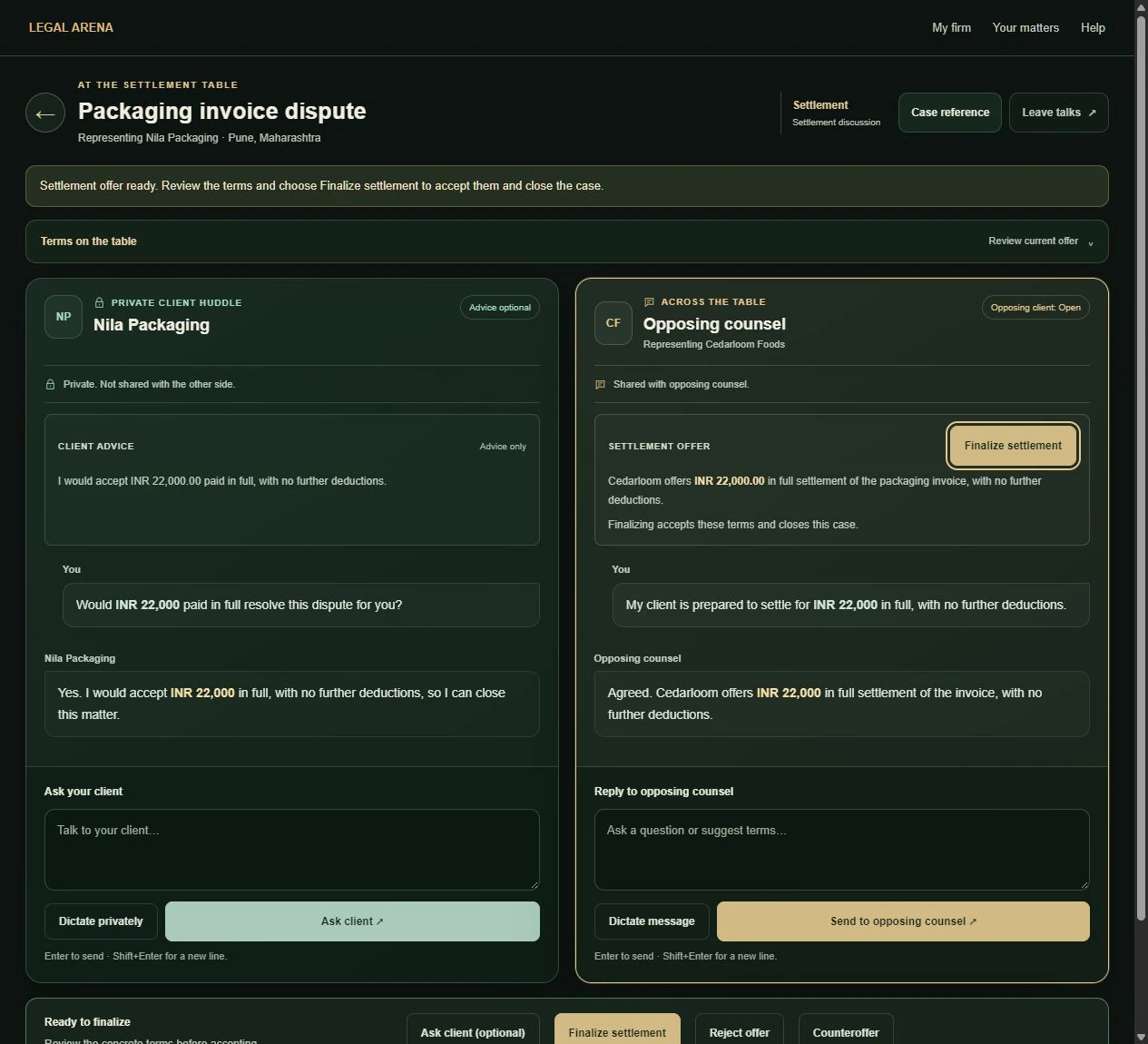
The solution can be practical: getting an identified sewing machine back without an unapproved repair charge can be a complete agreement. You do not need to attach a cash payment to make that deal count. What matters is a definite remedy both sides can understand.
Ask whether your client is willing to explore settlement if that instruction is missing. If the other side has already requested settlement in its notice response and your client's willingness is recorded, Settle takes you directly into the settlement game. You do not need another opening draft or repeated permission.
If the other side has not agreed to talk, the opening invitation or proposal obtains their response first. Willingness to talk opens negotiation; it does not accept final terms.
Private client huddle stays between you and your client. The advice panel reflects what they have told you and can be incomplete. Across the table is shared with opposing counsel. Review any suggested draft before sending it.
Each channel keeps its latest exchange visible and puts older conversation under Earlier messages. Type your own message or use Dictate privately for the client huddle and Dictate message across the table. Review the transcription before sending. Enter sends; Shift+Enter adds a new line.
Expand Terms on the table and compare the current offer with the public position. Check payment, corrective work, timing and any other obligations. Use Ask client (optional) if you want advice on an offer; consultation is not a veto or a required approval step.
A definite return of identified property is a concrete nonmonetary offer. An agreement only to inspect an item or review documents is an intermediate step. The action may say Review and get offer until an actual offer is available. You do not need to invent a payment, deadline or extra concession to finalize a definite remedy.
Finalize settlement accepts the terms and closes the matter. Revisit the final agreement and result through Your matters.
On a narrow screen, the private huddle and opposing-counsel conversation are stacked. Check the channel heading before sending. Sending dismisses the phone keyboard so you can read the reply, current offer or error; tap a text box when you want to write again. Scrolling to read earlier messages cancels the automatic move to the next step, and a background update does not pull you into another draft.
Open Case reference to review the case information without leaving talks. Choose Return to settlement to close it, or Settlement tour in its footer to replay the optional walkthrough. A first visit can also offer the tour when no request or other dialog is in progress.
The tour explains the private huddle, Terms on the table, the message to opposing counsel and your final decision. Use Back, Next or Skip tour; Escape also dismisses it. Return to talks finishes the walkthrough without sending a message, accepting an offer or reopening ended negotiations.
Your legal fee follows the signed engagement and is separate from the money or property your client receives. A satisfying noncash deal may produce no monetary recovery for a contingency fee. Quality, client satisfaction and professional reputation matter; settlement does not require or award lawyer XP.
Professional-negligence claims have their own settlement review. Insurance does not cover a voluntary bilateral settlement without insurer consent; read those terms before accepting.
This is where you put your preparation to work. Choose the fact that matters, connect it to the governing rule and tell the judge what should follow. Opposing counsel will answer. Read that response, watch the judge's questions and decide what your next submission needs to accomplish.
Try building a submission around three sentences: “This is the fact that matters. This rule explains its significance. This is the order my client asks for.” Then add the detail needed to answer the actual dispute. You can write in your own words; the challenge is making the connection clear.
The judgment tells you what the court decided and why. Your advocacy review shows what helped and weakened your presentation. A win can still reveal a missed opportunity; a difficult loss can contain good work. Read both before choosing your next case.
The courtroom percentages show how persuasive each side's case currently appears. They are separate from Client satisfaction, which appears with the final ruling after judgment.
From preparation, follow the matter's court-readiness controls, either directly or after reviewing a notice or claim response. Read the current issue, the opponent's submission and the judge's feedback before sending yours. Choose a suggested approach or write your own where those controls are offered.
Use the applicable law or game rulebook supplied with the case, and explain how it applies to the record. Where evidence presentation is available, select the material you want to put before the court and connect it to your argument.
In the focused hearing view, Case file, Case brief, Evidence and Hearing record open supporting material without leaving court. Close the reference panel to return to your submission.
Take the floor presents your argument. Progress stays visible while the court responds. On a phone, sending closes the keyboard so you can read the response; tap the draft when you want to write again. If an argument fails, the error preserves your draft. Use Review selected evidence if offered, correct the issue and present again.
Ask for adjournment is for a specific, material gap that further questioning or obtainable proof could realistically fix. Explain what you need and why it matters. The remaining allowance is shown; a denied request does not consume an argument turn. A granted request reopens preparation so you can address the gap before court resumes.
If Unlock More Cases appears before your first ruling, choose See verdict at the bottom of that panel, beneath the purchase options and pricing text. Your completed case's verdict is free to read; you do not need to buy access to reveal it.
At the top of Final ruling, Client satisfaction shows your client's score out of 100, followed by their reaction and a reason. This assessment is about the judgment and your client's response, rather than a particular area of law. A historical judgment without a saved assessment says Satisfaction not recorded; the game does not substitute zero or invent a score.
The Deciding factor identifies what determined the ruling. What helped your side and What weakened your side review your advocacy separately. A weakness can remain even when other evidence carries the case.
Open Read full judgment for the findings and orders, and the judge-reasoning disclosure for more context where available. Distinguish admitted facts from independently proved facts, and missing support from a claim the court rejected on evidence.
Your signed engagement determines your fee, separately from the client's award. Winning does not guarantee a large fee; losing does not by itself establish poor ethics. The career record shows the resulting payments and professional changes.
Revisit the result through Your matters. Published reports appear in Legal World when the source's publication settings permit them.
Return through Your matters to resume saved work after leaving the browser. Quit case ends the live matter: a solo courtroom exit records withdrawal before final judgment, with no client-satisfaction assessment. Leaving an active player challenge records an incomplete withdrawal. Review the exit decision before confirming.
Ready for another problem to solve? Open your client enquiries and choose your next engagement.
Take the bench
Take the bench, hear conflicting accounts and make a decision you can defend. You choose which questions to pursue, when an objection deserves to stand, how to keep order and what the final remedy should be. A difficult judgment can turn on a small contradiction or a concern that nobody has answered yet. Each hearing builds your judicial career in the country you choose.
Select Judge in the header, then Choose your next case in your chambers. Choose a difficulty and legal source, then select Take the case on a docket card. The game creates the parties and their accounts; your task is to discover what the record supports. Start with Guided for a clear central issue, or choose a harder hearing when you want more competing evidence to weigh.
Your judge’s chambers
Open full size ↗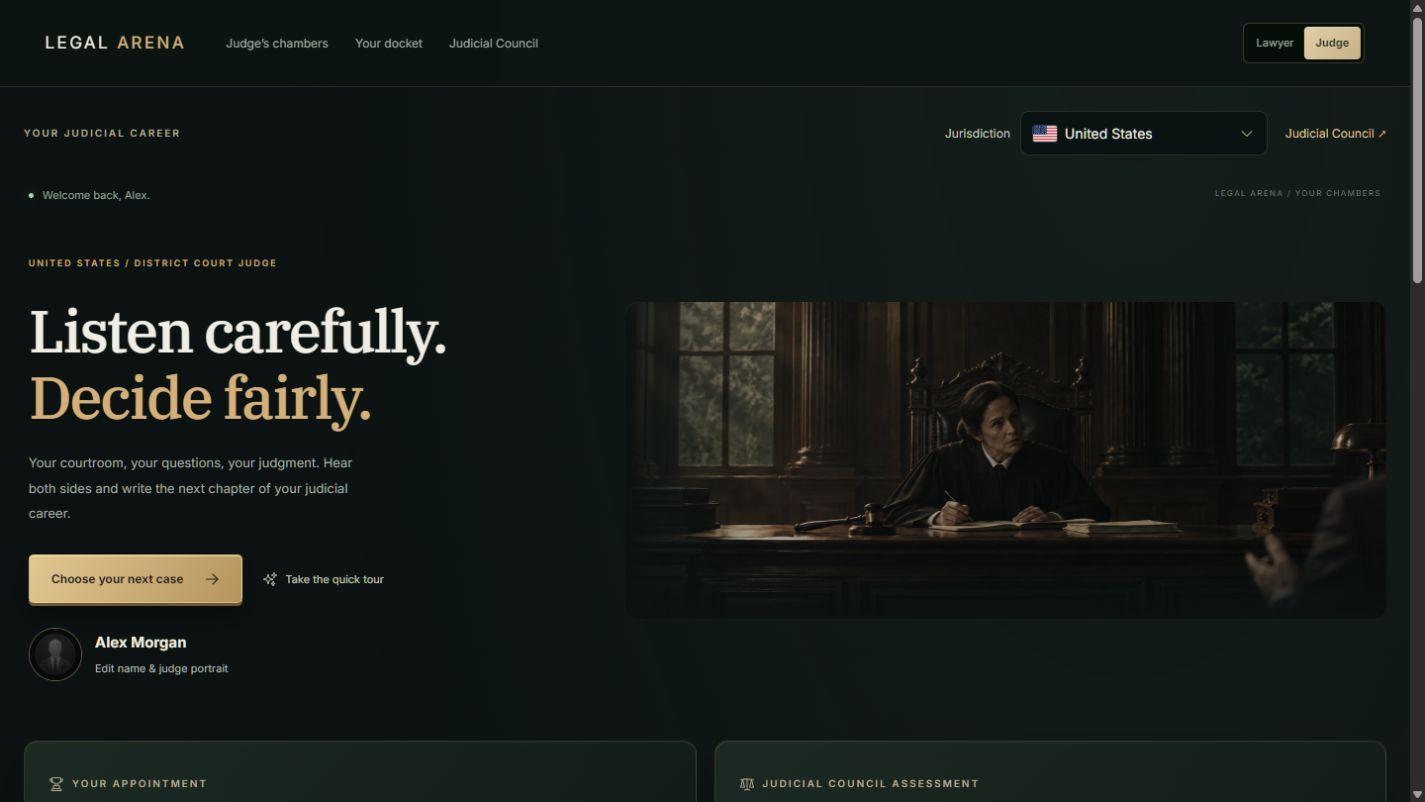
The default district-court docket has five genre cards, including family, marriage, contracts, tenancy and consumer disputes. Higher courts expand the default docket to ten and then fifteen genres. The selected slot refills when its case is ready. Your case files holds resumable hearings and signed judgments for the selected country.
The docket shows Start free judge case, Take the case or Unlock more cases according to your access. An eligible free judge case, previously purchased case credit or active Unlimited access covers the case access. Review any overseas travel quote before taking a case: applicable travel uses your fictional practice funds separately from that access.
A docket full of possibilities
Open full size ↗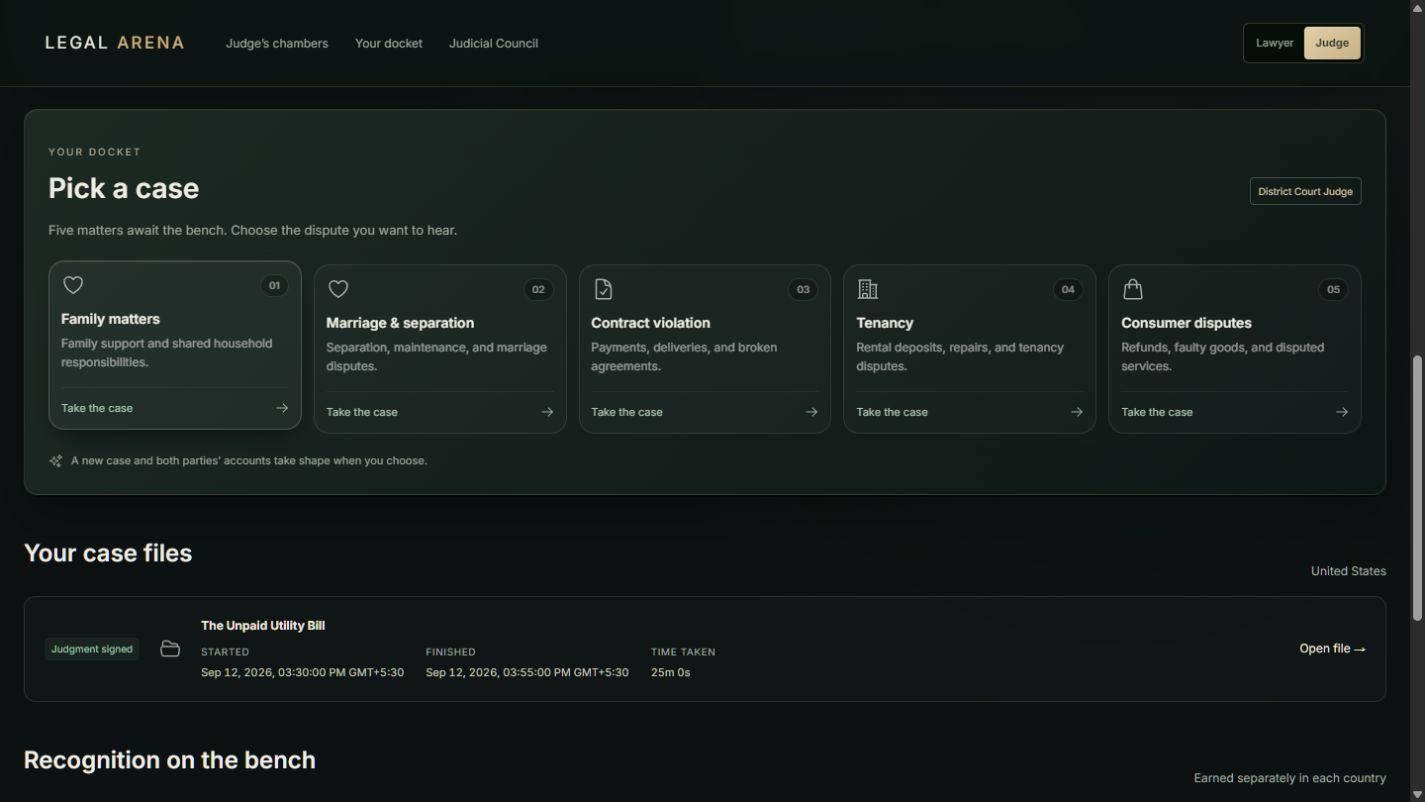
Read both fact sheets, identify the point they disagree about and ask a question that can clarify it. Follow a useful detail, test an apparent contradiction and give the other party a chance to explain. You decide when you have heard enough.
Ask, listen and clarify
Open full size ↗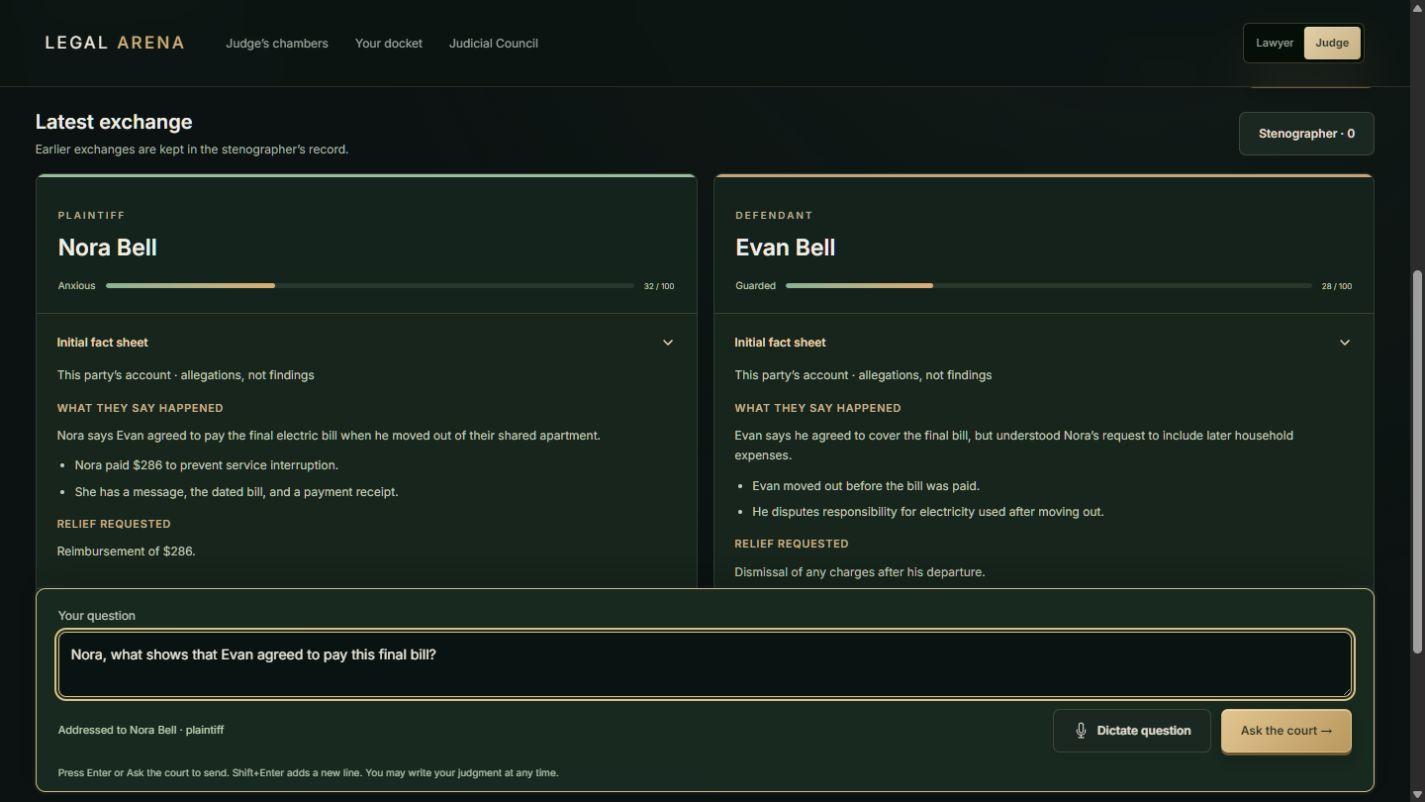
The plaintiff’s initial fact sheet appears on the left and the defendant’s on the right. These are their accounts of what happened and what they seek. Test their assertions against the testimony and supplied evidence.
Write, for example, “Nora, what did Evan agree to pay?” or “Defendant, when did you move out?” If the recipient is unclear, add the name or role. Select Ask the court to send. Enter sends; Shift+Enter adds a line.
For speech input, select Dictate question, allow microphone access and choose Stop & transcribe. Review the editable text before sending. The latest exchange appears in the party panels; Stenographer opens the complete saved transcript, including objections and your rulings.
Refresh Legal analysis & references after important new testimony. It explains the game rules or supplied official provisions and identifies facts to clarify. You remain responsible for the findings and decision.
An objection pauses testimony and places its controls above the question box. Sustain objection limits the challenged answer; the party answers within your ruling or awaits a new question. Overrule objection lets the interrupted answer continue. Resolve the objection before asking your next question.
The emotion meters help you follow each party’s reaction. Order in court calls both sides to order and records your direction. For specific misconduct, open Courtroom order, choose the party and a warning, formal censure or contempt finding, and explain your reasons. Contempt also requires a penalty. Your orders form part of the judicial review; a quiet, well-run hearing needs no sanctions for their own sake.
Connect the facts you accept to the rules and the remedy. Explain how you resolved the important disagreement and why the order follows. You can decide at any time, so consider whether another question would change the result or repeat what is already clear.
Your decision, on the record
Open full size ↗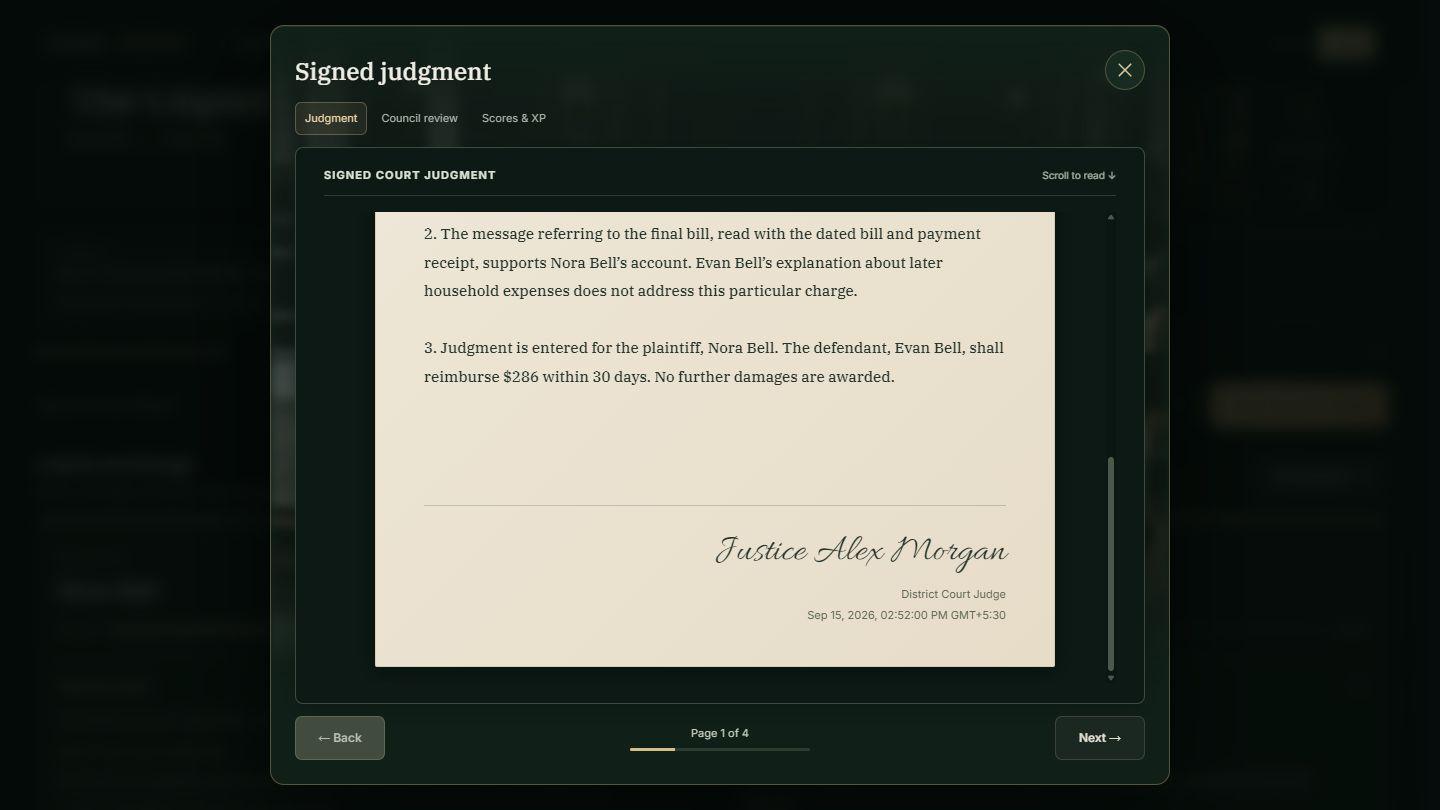
Prepare formal judgment paraphrases your words while preserving your findings, uncertainty, reasoning and remedy. It does not supply missing analysis or decide an omitted issue for you. Check the final wording, especially any payment, deadline or sanction you intended to order. Revise your reasoning before signing if an important concern remains unanswered.
Read the Council review beside your Judgment and Scores & XP. It explains your fact finding, legal reasoning, fairness, courtroom management and judgment clarity. Each party also receives a separate satisfaction assessment with reasons. Choose one thing to improve in your next hearing: a fairer question, a clearer finding or a more proportionate remedy.
Learn from the Council review
Open full size ↗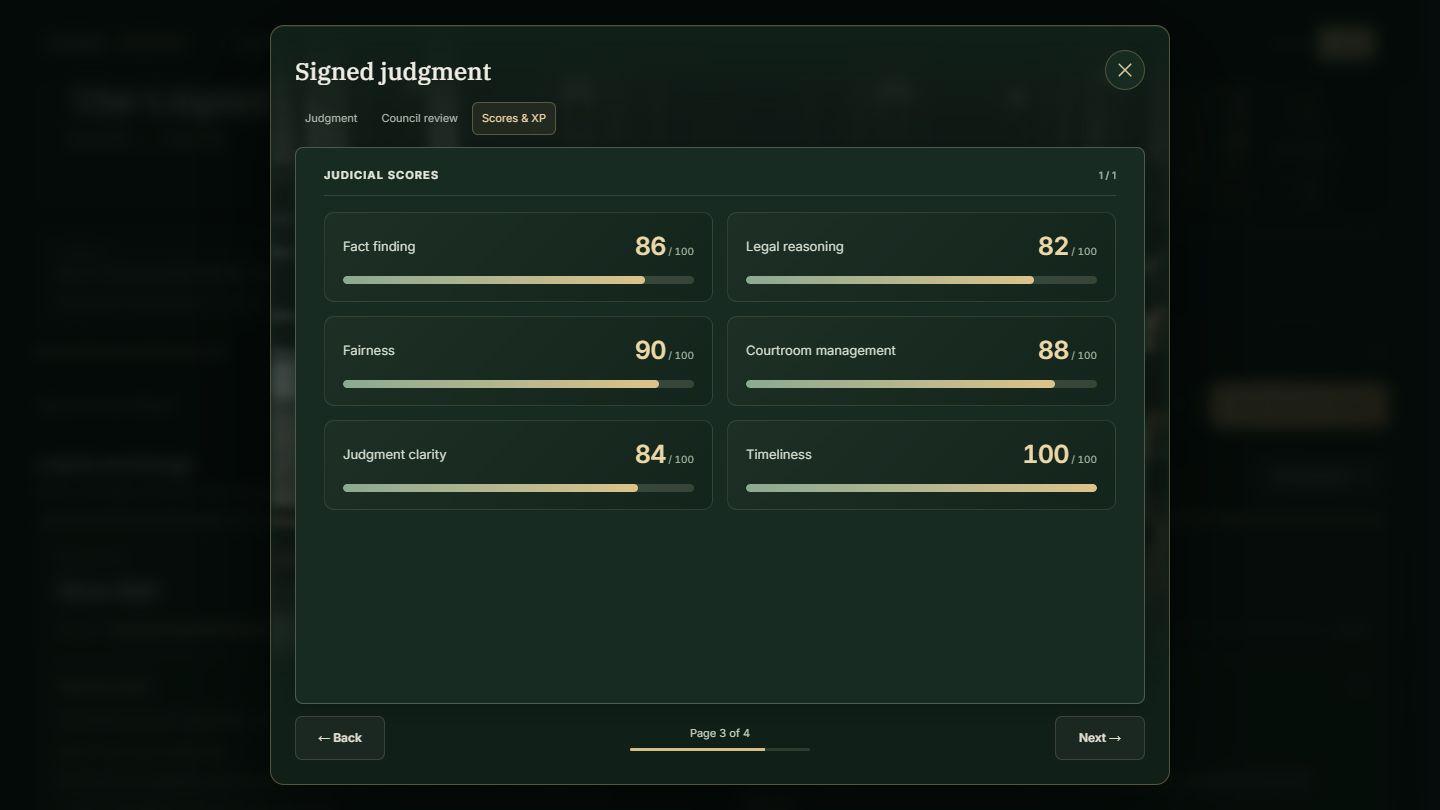
Hear both parties fairly. Each party’s satisfaction must reach the game’s minimum of 35/100. If either falls below it, the result is marked Injustice. The signed judgment and review remain recorded, but that judgment earns no judicial XP, timeliness bonus or advancement credit. Satisfaction considers whether concerns were heard and explained as well as the result; equal awards are not required.
Quality comes before speed. For a timeliness bonus, both parties must give testimony and your review average must reach 40/100, as well as meeting the satisfaction bound. A weaker individual score does not cancel an otherwise eligible bonus. An objection alone does not count as testimony. Time includes breaks and closed tabs; finishing faster than the target earns no extra credit. Read the target and the result’s explanation.
Build your appointment. In your chambers, Your appointment shows judicial XP, judgment totals and promotion requirements. Promotion depends on XP, qualifying judgments and review average together. Recognition on the bench shows achievements, and the Judicial Council lists your standing. Once earned, an appointment is retained even if a later score falls. Each country keeps its own career.
Select Finish on the final results page to return to your docket. You can revisit the signed judgment through your saved case files.
Screenshots show a fictional example session. Your cases, judgments and scores will differ.
Open your judge’s chambers →Building Your Career
Choose your clients, assemble a team and give your firm a character of its own.
Your inbox is where you start shaping the firm you want to run. Investigate a promising claim, take on a difficult defense, negotiate a worthwhile fee or walk away from a poor fit. You choose which problems become your cases.
Open Clients in My firm and browse the inbox. With access, Review enquiry opens a saved email conversation where you can ask about the facts, records, goals and budget.
Your case access is checked before the conversation opens. After your eligible free case, you need Unlimited access, an available case credit or an active free-access offer to review another enquiry. Without access, Review enquiry opens the purchase options immediately, before any consultation or new case starts. The same requirement applies to Continue email thread; your existing case records remain available.
Start with the enquiry inbox
Open full size ↗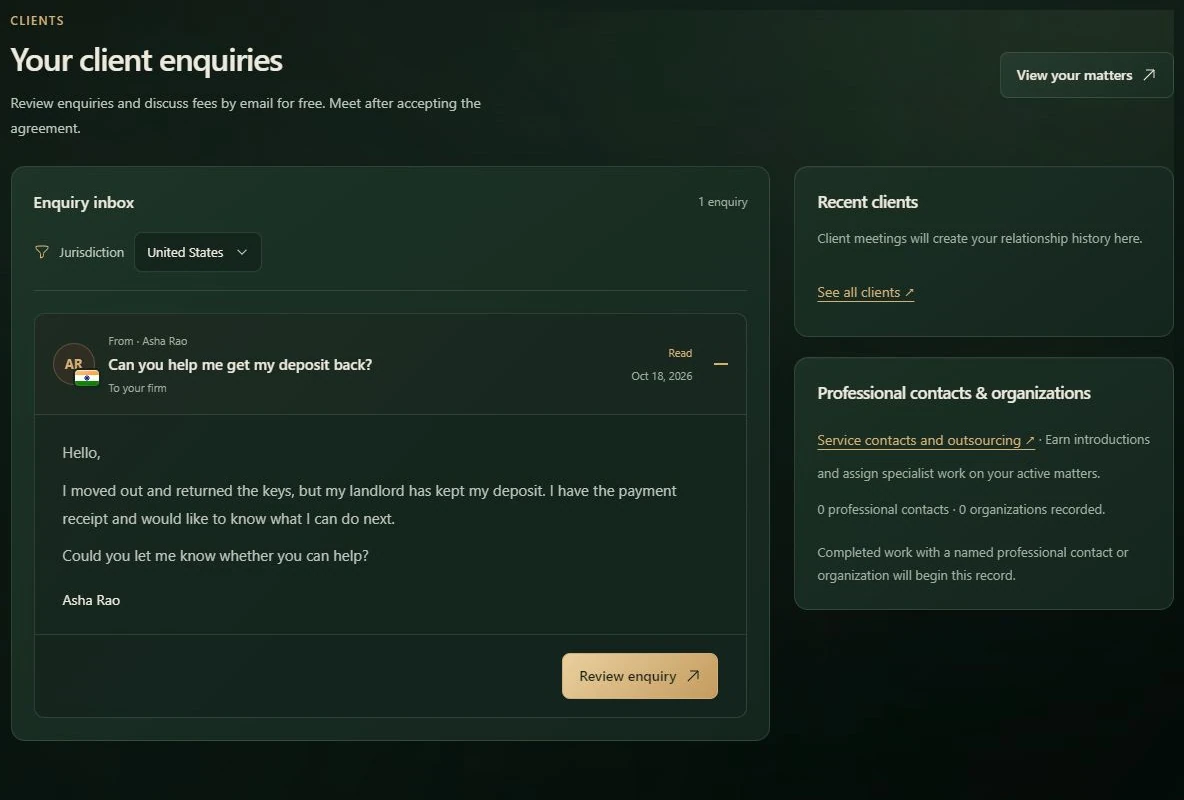
Foreign clients can bring much larger earnings: new foreign engagements use local-market fees at actual exchange rates. Weigh that opportunity against the cash needed for travel or remote support. You can pursue overseas work without an experience threshold; your firm still has to afford its share of the costs.
Decline this case turns down representation. Read the terms shown before confirming. You do not need to ask every possible question before making your decision.
While acceptance is being saved, Starting your case… shows progress; Opening your case file… follows while the interview loads. A failure leaves your saved conversation intact and shows an error. Use Retry starting case if offered, or retry the restored Start case action after addressing the error. Optional client visuals do not hold up the interview.
The fee controls show the client-currency fee, its home-currency equivalent and a recorded market rate. Case costs and cash needed appears before you send the agreement. Overseas in-person work includes quoted return travel, accommodation and local transport. Remote work uses local support without airfare or accommodation; the matter determines the arrangement.
The one-time quote covers the whole matter, including necessary follow-up visits and support. Your cash contribution must leave protected operating funds and existing commitments intact. Costs also apply to pro bono cases.
Use Request expense advance to ask the client to fund some costs. The limit is the quoted expense or their remaining budget after the legal fee, whichever is lower. Include it in the agreement you send; it is applied directly to costs when signed.
Compare Fee less your case costs with the cash required upfront. For contingency work, Potential net fee at the recovery cap is a possible maximum. See jurisdiction, exchange rates and foreign work for the illustrated review.
Return to an enquiry to continue its saved email thread. If a reply was interrupted, use the saved message's recovery control before sending it again.
If the inbox is empty, continue a saved matter or use Check again. After the day's enquiries have arrived, new ones can arrive tomorrow. Use the local retry control for a failed request.
The Jurisdiction filter affects future incoming emails. Existing enquiries and cases keep their original country; changing the filter does not move your home office. See jurisdiction and currency for the difference.
Your firm can begin with one desk and a client worth helping. From there, you choose its shape: keep costs low, make room for colleagues, or build a workspace around the work you want to take on. You own the firm from the start, including when you share a Community workspace.
Open My firm. Business is where you plan the operation, Workspace is where you arrange your room, and Team is where you find the people to fill it.
A larger office offers more floor space and case capacity, with rent to match. A new colleague brings skills and a recurring salary. Compare the work your firm can support with the cash it needs to keep running. Staying small while you finish a matter is a valid choice.
Business: operations and available funds
Open full size ↗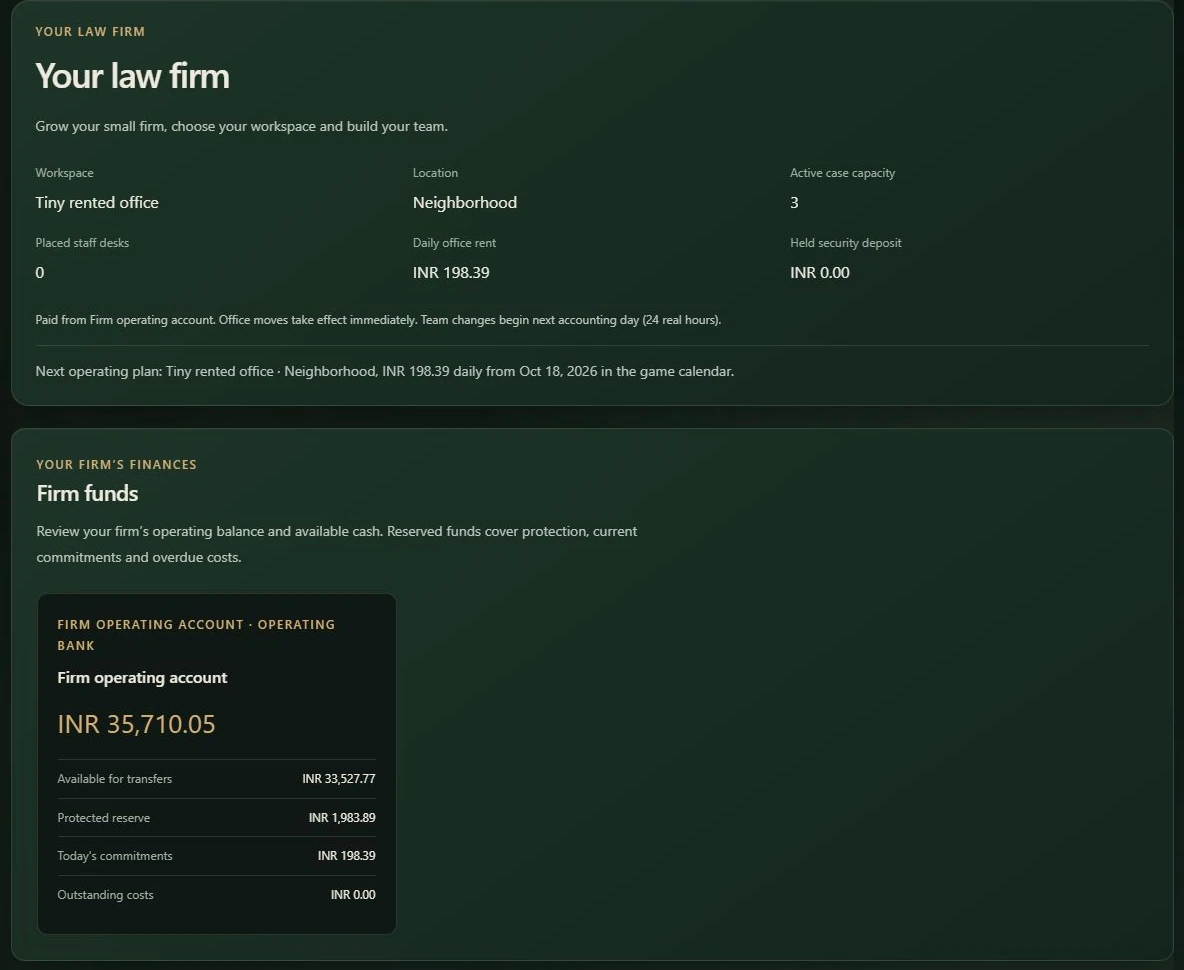
A security deposit stays held while you use the office. It is an asset rather than earned income or freely spendable cash. The review identifies where a previous deposit refund will go. Acquired office assets remain in your ownership when you move.
In Firm funds, each bank has its own balance, available transfers, protected reserve, today's commitments and outstanding costs. Your operating account receives earned fees and eligible bonuses and pays the bills. An owner draw moves money between your own accounts; it does not create income. See money and recovery before expanding.
Once you rent a workspace, arrange it around your needs. Useful equipment can provide its listed benefits, while a placed staff desk opens a place for a colleague. You can move furniture, store it for later and change wall and floor finishes for free.
The Community workspace comes furnished as a shared room and cannot be edited. It remains a free place to practise until you want a room of your own.
Workspace: room and placement
Open full size ↗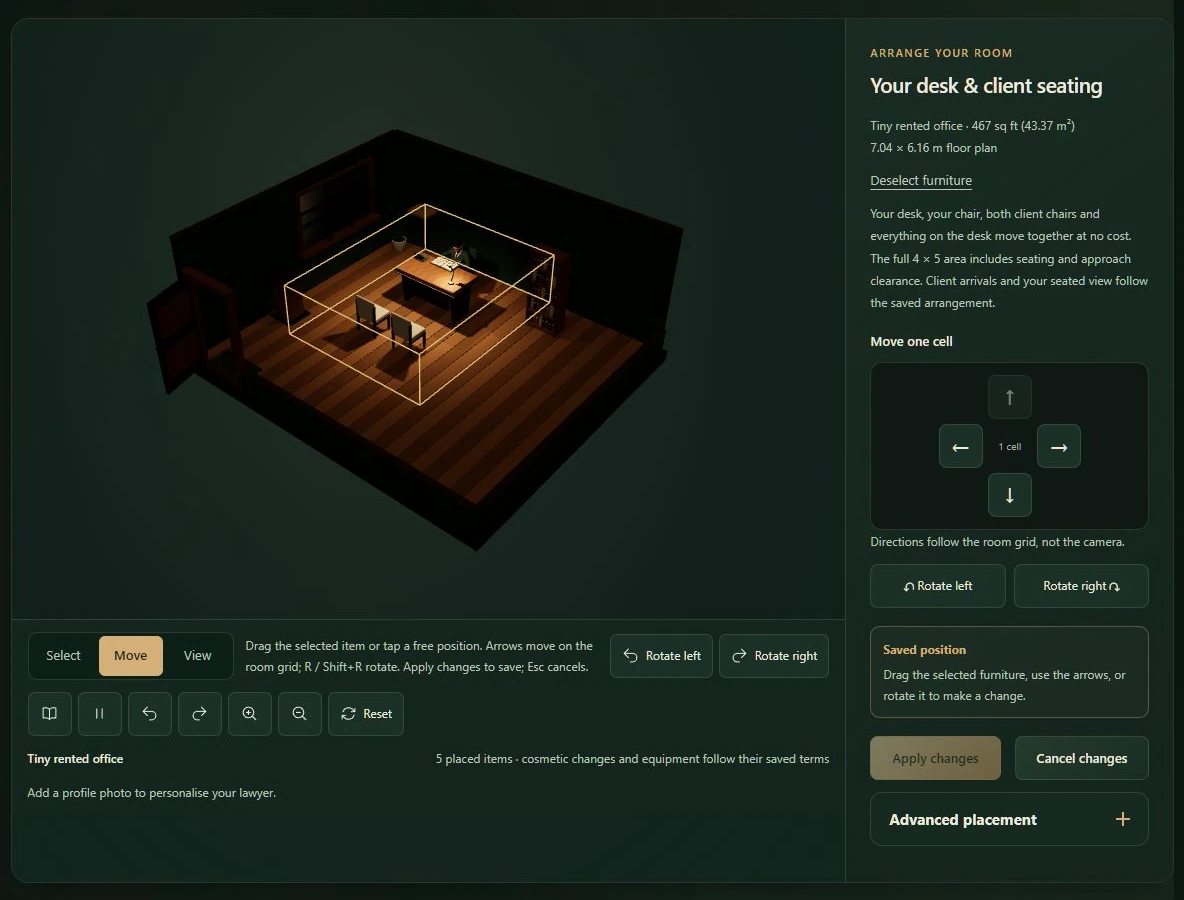
Advanced placement provides exact surface, column, row and rotation controls. A blocked preview explains what prevents the placement. Walls & floors lets you change the room's finishes for free.
Only compatible, placed equipment provides its listed benefits. Duplicate items follow the stated stacking limits. Your own desk and a staff desk in storage do not create staff places: each employee needs a placed staff desk. If no clear floor area fits another desk, rearrange the room or choose a larger workspace.
Award furniture displays an award you have earned; buying it does not grant one. Existing certificate frames remain arrangeable, but new frames are unavailable until certifications exist.
Announce an opening, meet applicants and explore their skills through conversation and work samples. A candidate's asking salary is a starting point for an offer. You decide when you have enough evidence to hire, keep interviewing or move on.
You can advertise and interview before adding desks. Confirming a hire needs a free placed staff desk and enough available funds. New employment and its recurring salary begin on the next accounting day.
Team: staff, openings and applicants
Open full size ↗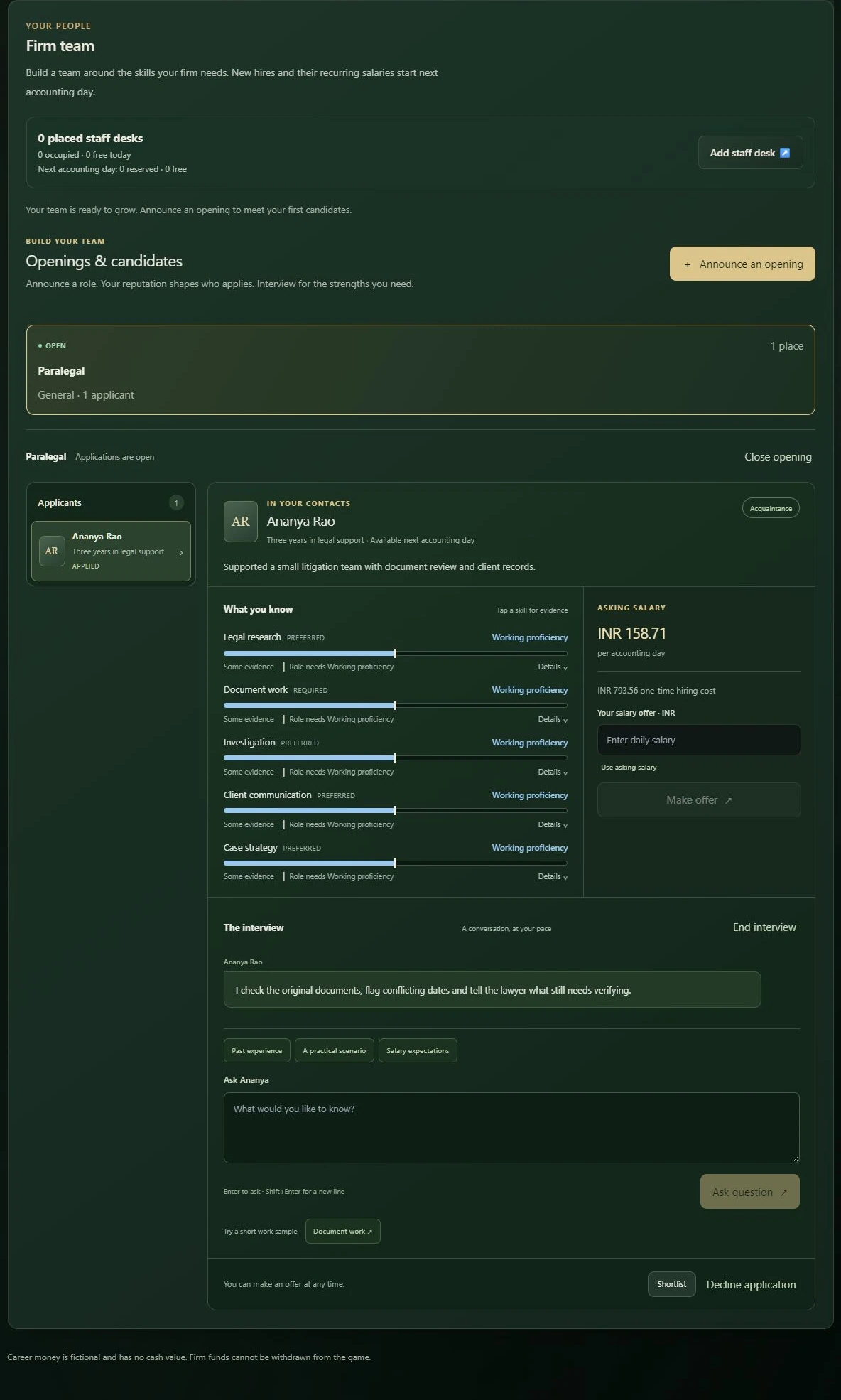
Ending employment takes effect from the displayed next accounting day; today's payroll remains owed. Former employees remain in the firm's history.
Review each person's discretion, integrity, criminal willingness and recorded conduct alongside their assessed skills. See discretion and misconduct for how those traits affect assignments.
Interns have no hiring fee and begin with a small stipend, developing skills and a need for supervision. They use a staff desk like any other employee. Experienced hires bring their established abilities and relevant work history into the same career system.
Open Career development on a person's Team card to choose a goal, check development milestones or arrange supervision. Every career destination remains open: relevant skills and experience carry across paths. You can supervise directly; an eligible staff mentor uses their working time to supervise a colleague.
After an employee's case report is complete, open it in Case actions and select Review work & develop skills. Varied, relevant work develops the skills used. Repeating the same assignment type on the same case adds no extra progress. Supervised development work produces preliminary notes that still need your review.
When a role's milestones are ready, review the promotion on the employee's Team card. Check the new salary, responsibilities and displayed effective date before confirming. There is no second hiring fee. The new role and pay begin next accounting day; the same person keeps their identity, learned skills and work history.
On an employee or intern's Team card, select Schedule one-on-one. Choose an optional agenda and Schedule and begin; the meeting starts immediately. Ask about workload, development or compensation, then finish the private check-in to record the happiness, stress and reasons they shared. The card keeps that dated assessment until your next substantive one-on-one. Their feelings can change between conversations.
Use Schedule team meeting to invite several colleagues into the same room. Address someone by name, select recipients or speak to everyone in the shared textbox. You can ask to hear from each person in turn. Private compensation concerns stay in one-on-ones. Recognition and useful discussions can support morale, while repeated speeches cannot replace manageable work, fair pay or kept promises.
Employees can request a private conversation through the Inbox. Discuss a raise, make a counteroffer or agree to review compensation by a specific game date. A counteroffer changes no payroll until you review and confirm the agreed salary. Standing work plans and confirmed pay changes begin next accounting day.
Repeatedly unresolved concerns can lead to warnings, notice and departure. New warnings leave time to respond when you return to the game. Concrete promises confirmed during a meeting are remembered: follow through on the assignment, work plan or supervision you agreed to provide. Former employees and their departure reasons remain in your team history.
Review any proposed salary, career, mentoring or work-plan change before confirming. Conversations record ideas and commitments; they do not silently change employment terms. Confirmed pay and role changes begin on the displayed next accounting day. Meeting records remain available to resume a conversation or read its notes and follow-ups.
Your team can research law, investigate, organize evidence, prepare witnesses or review strategy. Assign work with a clear question in mind, continue your own preparation and return to the report when it is ready. Work continues while you are away; the Inbox flags a genuine completion or failure.
Employee assignments are covered by salary. An eligible outside contact charges a quoted fixed fee. Compare the person's capability, availability, time and cost before assigning. You still decide which findings help the case and which need checking.
In the case file, open Case actions or Your team. Choose Research law, Investigate, Organize evidence, Prepare witnesses or Review strategy. Select a person with that capability, add instructions and optionally select the facts you want them to focus on. With no selected facts, the assignment covers the whole case.
Review the quoted real-time duration and fee before assigning. Employee assignments are covered by the employee's existing salary. An outside contact has a quoted fixed fee charged once for the assignment. A busy or unavailable person cannot take a new assignment yet.
Work continues while you are away. A completed report appears under Assignments and reports, and the Inbox records a genuine completion or failure update. A report marked stale was prepared against an earlier case file: compare it with the current facts before relying on it. Staff help you prepare; you still choose the arguments and assess the evidence.
Overview shows your next move; Clients holds enquiries and relationships; Finances tracks accounts and reports; Profile holds your identity and record. These join Business, Workspace and Team as seven areas of the same dashboard.
Every matter becomes part of the firm you are building. A useful settlement, a well-argued judgment, a returning client and a healthy bank balance tell different parts of that story. Choose the work you want to be known for, then use your record to see how it is going.
Select Profile in My firm to see your identity and track record. Lawyer progress comes from recorded work, relationships and finances, with no lawyer XP level to grind before taking clients. Foreign work depends on practical costs and resources; see clients and fees.
Profile: your professional track record
Open full size ↗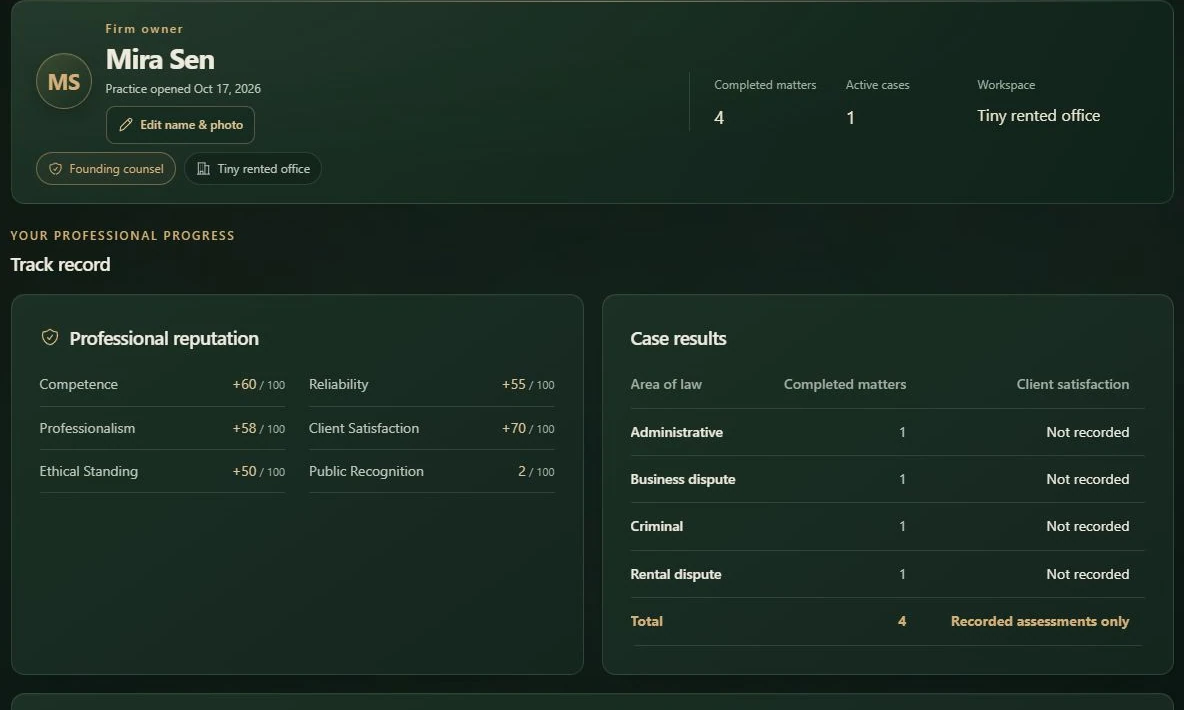
Help the client pursue a supported outcome, keep the fee and costs in view, and take care over the evidence and your conduct. Client satisfaction, profit and professional standing measure different things. Read them together when deciding what to improve next.
Your Profile shows completed matters, active cases and the current workspace. Use Edit name & photo to update how you appear.
Case results groups completed matters by area of law and shows average recorded client satisfaction. A matter without a satisfaction assessment still counts as completed, but its missing score is not treated as zero. On a narrow screen, scroll the table horizontally to read every column.
Notifications and career record preserves routine career events as history. The header Inbox is quieter: it highlights new messages and significant updates that may need attention. Accepting a client or recording a routine reputation change can appear in your history without interrupting you with another Inbox notification.
Client relationships record returning work and referrals when supported by your history. Professional contacts and organizations can grow through introductions and completed work; eligible contacts can provide paid specialist help through case assignments. Read their service, availability, duration and quoted fee before assigning.
Some satisfying completed engagements also earn extra recognition or a client-specific introduction, including community leaders, specialist providers and VIP contacts. Pro bono can improve the chance of a gratitude reward. Read client rewards and possible introductions for the full list and their uses.
Lawyers & rankings shows completed matters, recorded client satisfaction and public rating. Satisfaction averages use actual recorded assessments; older matters without an assessment remain unrecorded.
Rating begins at 1,000 and cannot fall below 800. A new court judgment changes overall and specialty rating according to your own client's satisfaction, including in player challenges. One client's score does not determine the other client's score. Settlements record satisfaction without adding or removing rating. A settlement that resolves the client's problem can still be a worthwhile result even though it does not change court rating.
Judge Mode has separate judicial scores, XP and promotion requirements for each country.
A client to reply to, a matter to finish, a team to pay: My firm brings your next decisions together. Start with the work on your desk, check what you can afford and choose where to put your attention.
My firm · Overview
Open full size ↗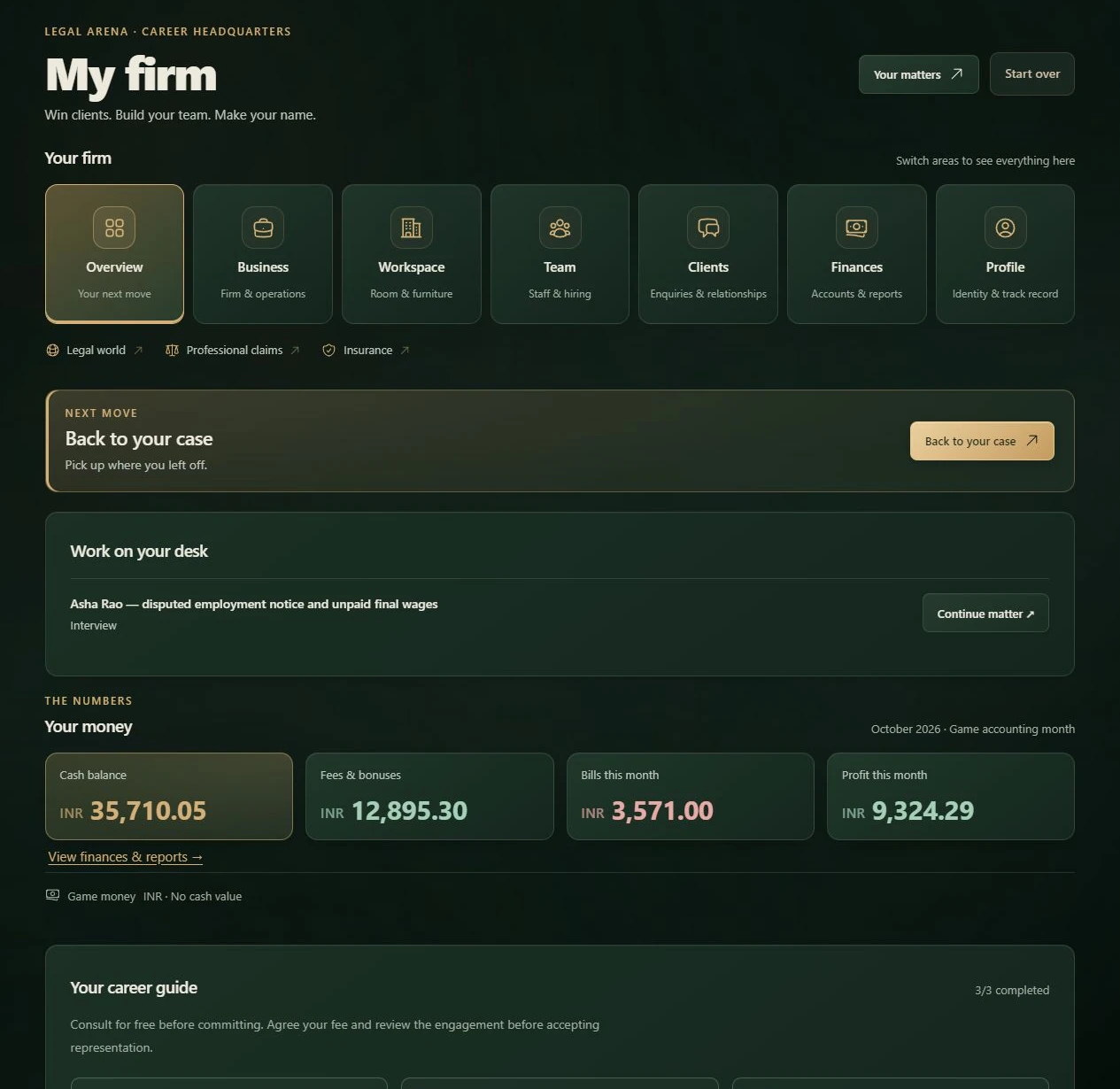
The seven tiles take you from the big picture to the part of your firm you want to work on. Explore them as you need them. Your matters and Matters in the header return you to saved cases.
The links below the tiles open Legal world, Professional claims and Insurance. Lawyers & rankings and Challenge mode are separate destinations in the header.
For a quick introduction, take the Practice tour. It follows the actual screens, so you can get your bearings and return to playing.
The Practice tour control in the header uses a question-mark icon. You can also launch the tour here. For a new practice, a short introduction can appear after profile review and the initial dashboard load finish. It covers your next client, money, professional record and next move. Returning players with existing professional work are not asked to repeat the beginner introduction.
Replaying the Practice tour opens the full reference: Overview, money, client emails, jurisdiction, Business, Workspace, Team, Finances, Inbox, Profile and your next action. Next opens the relevant dashboard tab and highlights its controls. Use Back to revisit a step; left and right arrow keys also move between steps when you are not typing.
Practice tour
Open full size ↗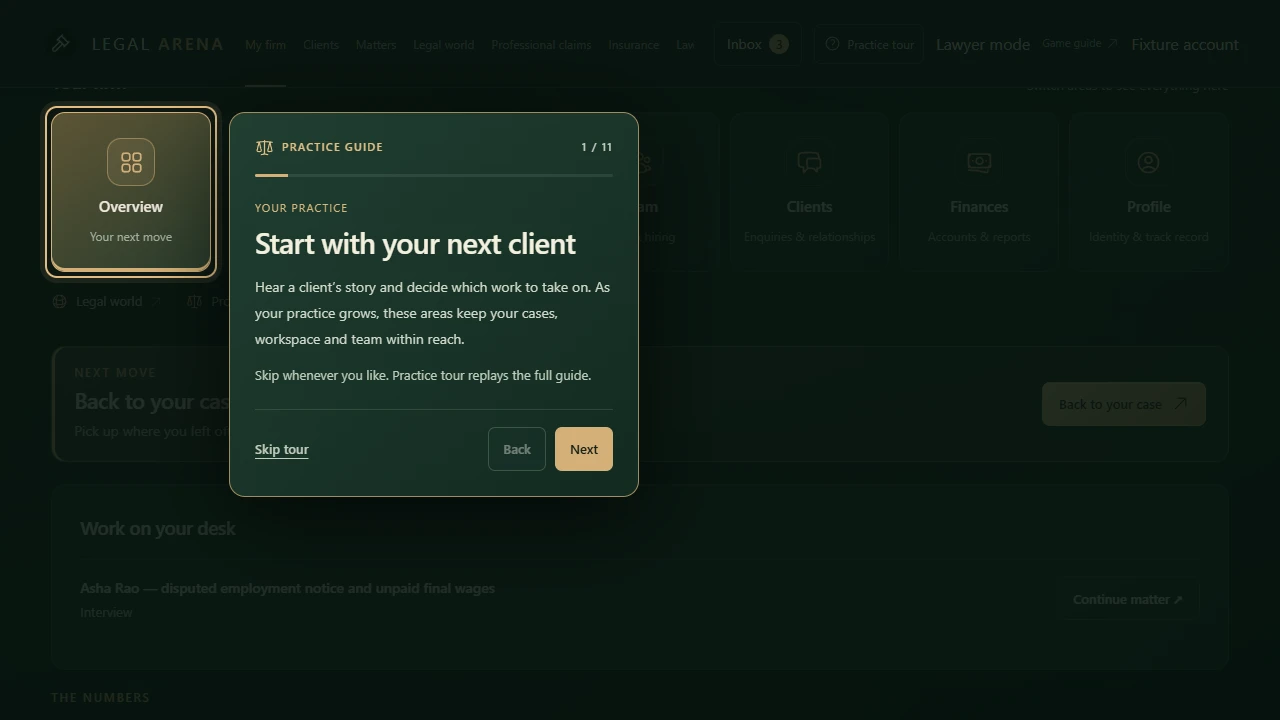
Skip or close the tour to return to the tab you started from. The final button follows your firm's current next action: it may open enquiries, resume a saved conversation or return to an existing matter. The tour does not send messages, accept agreements or spend money for you. Completed and skipped tours stay dismissed until you replay them. Sections unavailable to your account are omitted.
Open Profile to edit your public display name, firm name and professional portrait. You can keep typing your name or firm name while a new portrait is being prepared. Photo changes save immediately; when processing finishes, use Save profile to save your other edits.
Your display name is shared between Lawyer Mode and Judge Mode. An alias is allowed. Your established home office country stays permanent; editing a portrait or name does not move your firm.
Your employee has finished reviewing records. A client has answered your email. A claim needs attention. The header Inbox points you to those updates, so you can pick up the next useful piece of work.
Open Inbox in the header to see new events. Its badge counts unread updates. Select an entry to open the relevant message, matter or firm record; use Mark current notifications read to clear the current unread status.
Inbox · meaningful updates
Open full size ↗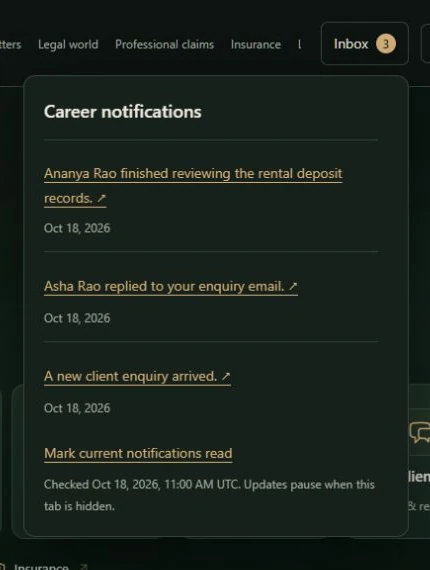
Routine confirmations, reputation changes and milestones remain in the matter result, Profile, finances or activity history. An empty Inbox means you are caught up. Refreshing preserves the same updates.
A loading overlay can appear when you first enter the dashboard or move to a different page. Switching dashboard tabs keeps the dashboard visible. An area still loading shows its own placeholder; an area being refreshed retains its content.
If an action reports an error, keep your draft visible and use that area's recovery control. In a client email thread, retry the saved interrupted message before creating another. Reopen an existing case from Matters. Wait for a financial refresh to finish before acting on a purchase or cost quote.
Advanced Systems & Reference
Weigh overseas work, protect your finances and look up the rules when they matter.
A satisfied client can sometimes give your firm something beyond the agreed fee: extra public recognition, an introduction, or both. These rewards are occasional. They depend on a completed matter and the client's saved background and relationships. Pro bono work has a better chance of gratitude rewards, while access requirements and case costs still apply.
Read an earned reward with the completed engagement and find introductions in Contacts & outsourcing. Each contact records who introduced you and the source matter. Returning to a result preserves the same reward; it does not draw another introduction.
Occupation and established social connections explain an introduction. Wealth alone does not establish a relationship, honesty or criminal willingness. Older clients keep their saved backgrounds.
| Background connection | Contact | What they offer |
|---|---|---|
| Workers, drivers, security workers and apprentices | Union organizer | Introduces workers seeking representation in employment disputes. |
| Tenants and neighbourhood relationships | Tenants’ association leader | Introduces households with housing and tenancy matters. |
| Farming and agricultural work | Agricultural cooperative head | Connects farming households and agricultural businesses with your firm. |
| Shops, trades and independent businesses | Traders’ association leader | Recommends your firm to local traders and independent businesses. |
| Community and charitable relationships | Community charity coordinator | Builds community recognition and introduces people seeking affordable representation. |
| An established faith-community connection | Religious community leader | A connection through the client’s saved faith-community involvement, with community and charitable referrals. |
| An established civic or political connection | Local political organizer | Introduces civic and public-interest matters through an established community relationship. |
| Education, healthcare and institutional work | Institution administrator | Introduces clients from education, healthcare and other institutions. |
| Engineering and technical work | Independent technical expert | Reviews the recorded technical issues and evidence in an existing case file. |
| Accountancy and consulting | Financial review specialist | Organizes financial records and reviews documented inconsistencies. |
| Business ownership and management | Chamber-of-commerce officer | Introduces small and established businesses with new legal matters. |
| Corporate and executive relationships | Corporate general counsel · VIP | Provides independent strategy reviews and can introduce corporate clients. |
| Executive, business and investment relationships | Company chief executive · VIP | An established executive who can introduce companies seeking representation. |
| Investment relationships | Family-office representative · VIP | Introduces investors and private businesses with substantial legal work. |
| An established media acquaintance | Local journalist | Offers public recognition and introductions through an established media acquaintance. |
| An explicitly recorded local powerbroker connection | Local strongman and fixer | A powerful local acquaintance with explicitly recorded conduct risks and assignment capabilities. |
Referral contacts can introduce future client enquiries when suitable work is available. Service providers list their assignment capabilities, fee and availability. Influential connections have their own reach and referral circles. A VIP introduction opens opportunities; it does not decide a case or guarantee a retainer.
Every employee has Discretion, which describes their handling of sensitive work, and Integrity, which describes their professional boundaries. The conduct profile also states criminal willingness, recorded history and any explicitly supported misconduct assignments. Review these alongside skills when interviewing, hiring and choosing an assignee.
A history entry alone grants no assignment capability. An outside contact needs an explicit conduct profile, too. Principled staff refuse criminal assignments. On ordinary assignments, stronger discretion reduces the chance of a simulated confidential-handling lapse. A recorded lapse costs one professionalism point when the report is released; the game never discloses your private file to another player. Discretion also affects misconduct exposure risk, while responsibility for an authorized action remains yours.
Open Controversial actions beside the case-action controls, or expand Controversial and criminal actions inside the Case actions modal of an active represented career matter. These are separate from ordinary legal research, investigation, evidence organization, witness preparation and strategy review.
Each misconduct action can be authorized once per matter. Reopening the modal or retrying a saved request preserves the same result. High discretion can reduce exposure but never makes it impossible. An action that finishes after the matter closes cannot change its final terms or judgment.
A good matter can fund your next move. Rent and payroll keep coming between matters, so timing matters as much as the fee. You choose how much room to leave for a quiet period, a useful hire or a promising foreign engagement.
Select Finances in My firm, or open Finances & reports. Start with available cash and the next bill, then look at whether your work is covering the cost of running the firm. Legal fees come from actual matters; there is no automatic daily salary.
Finances: bills and reserves
Open full size ↗
The balance is one part of the picture. Available funds allow for protected cash and commitments; runway helps you judge how long current resources support recurring costs. A large fee due later cannot fund an expense due now.
Read the fee alongside its payment conditions and your case costs. A fixed fee, a held retainer and a possible contingency payment give you different cash plans. For foreign work, compare the native-market fee with your share of travel or remote support costs before accepting.
Accepting a client does not by itself turn the quoted fee into earned income. A retainer is held separately until the signed preparation milestone and forms part of the total fee. It is not spare operating cash for travel or furniture. Fixed fees and completion payments follow the signed conditions; a contingency fee depends on actual recovery, the agreed percentage and its cap. Client damages or an opponent's payment to the client are not automatically your legal fee.
For foreign work, review the native client fee, its home-currency equivalent and the dated exchange rate. Travel, accommodation, local transport or remote support are separate case costs. An agreed client expense advance offsets those costs and is not legal fee income. See clients and fees for the agreement review and cash needed upfront.
Monthly reports show whether the work you have earned covers the costs that arose. Read them alongside cash paid and current obligations: a profitable month and a comfortable bank balance are different things. Use that view when choosing between expansion, another matter or a leaner workspace.
Monthly reports: earned income and expenses
Open full size ↗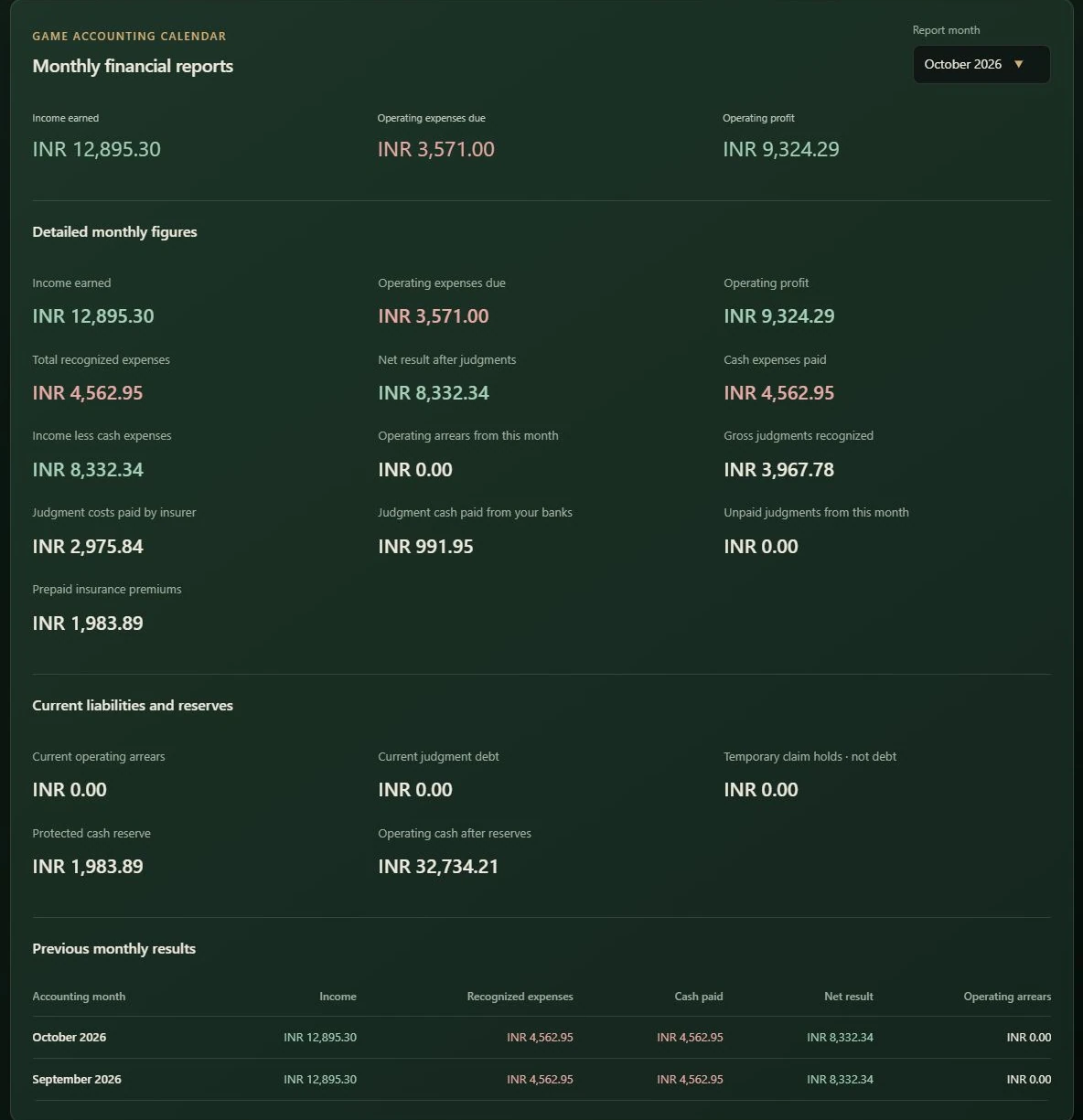
Starting grants, transfers between your own banks and client expense reimbursements are not earned legal fees. Office purchases and transfers stay outside ordinary operating profit. Judgment figures separate gross liability, insurer payment, cash paid from your banks and the amount still unpaid. An insurer paying a claimant does not add cash or fee income to your account.
If the app says Your expense records are catching up, use Update bill records before making a firm decision. Rent and salary already incurred remain due at their original terms. A report shown during catch-up includes the periods recorded so far; update the remaining periods for the complete picture.
If costs start to outrun income, the free Community workspace gives you a way to keep handling matters while rebuilding. Review the effect on your team before moving. Existing debts still need paying, but you can reduce future commitments and use affordable cash for repayment.
If quoted terms change during a review, return to the current choices and review them again. A saved decision confirmation shows the result; use it before repeating a purchase or payment.
All career funds are fictional and have no cash value. Purchased case credits and Unlimited are separate. Changing the displayed currency does not change your spending power or commitments.
Foreign work can bring a larger fee into your firm. New foreign clients pay native-market fees converted at actual market exchange rates, so the opportunity goes beyond changing the currency symbol. The decision is whether the work leaves you enough after its practical costs.
There is no experience, XP or completed-case gate for foreign clients. The usual case access requirement still applies when you open an enquiry. You also need a viable engagement and enough available cash for your share of the work. Choose a jurisdiction in Clients to shape future enquiries, then review each matter on its own terms.
An in-person matter may need return travel, accommodation and local transport. A remote matter uses local support without airfare or accommodation. The handling arrangement belongs to the matter; changing a country filter does not turn a trip into remote work.
For a domestic engagement, meet your client in your office; a saved engagement shows Meet your client. An overseas matter recorded for remote handling shows Begin remote interview. Read the matter's recorded arrangement and costs before sending the agreement.
Look at your cash needed upfront and the fee left after your case costs. A client expense advance can fund some of those costs if you agree it before signing. A high completion fee or a held retainer cannot pay today's travel bill by itself.
Read the foreign fee and practical costs together
Open full size ↗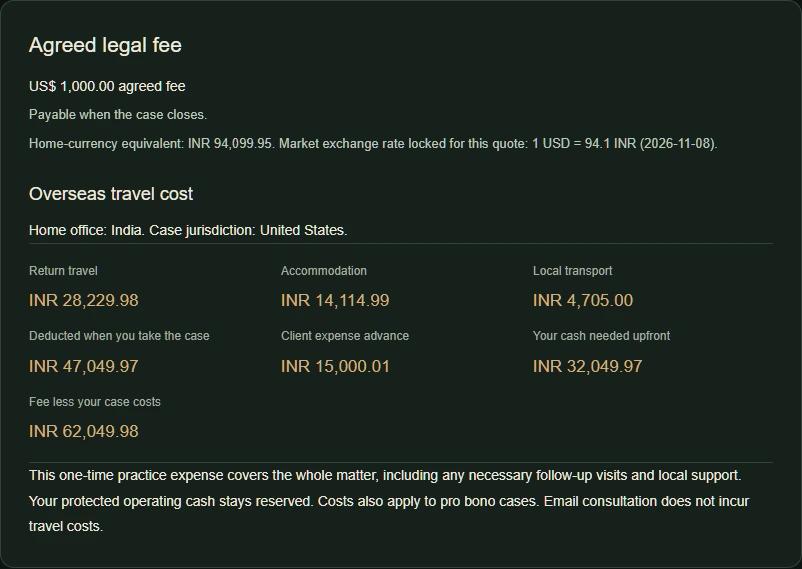
In the Clients tab or client enquiry inbox, open Jurisdiction, search for a country and select it. This affects future incoming client emails only. Already received emails and ongoing cases keep their original jurisdiction. Selecting a country does not move your home office or change your firm's currency.
Player challenges and Judge Mode have their own country controls. Every created matter, including your earlier cases, keeps its setting, parties and records when you change your preference.
Your home office, a client's jurisdiction and the currency of an engagement do different jobs. Your home office determines your practice currency and domestic pricing. A foreign client's matter keeps its own jurisdiction.
Home-office prices use household purchasing power, often called PPP, so domestic game costs reflect the local economy. New foreign engagements use native-market fees and budgets, with market exchange rates to value those amounts in your home currency. A foreign fee is an economic opportunity, not merely a different currency symbol on the same domestic fee.
The foreign fee review shows the client-currency fee, its home-currency equivalent, the exchange rate and the rate date. That quote records its rate so later exchange-rate changes do not silently rewrite your offer. Your operating balance and commitments stay in home currency. Displaying the same amount in two currencies does not create extra money or alter checkout prices.
These fee and expense-advance terms apply to career client engagements. Judge Mode and player challenges show their own travel reviews, funded separately from case access.
Check the enquiry's own country rather than expecting existing emails to change. For firm money, open the Currency disclosure and check the home office. For an overseas proposal, check the fee's own currency, locked rate and quote date. These are different from changing the jurisdiction filter.
Open About these rates for the purchasing-power source and reference year. The currency disclosure also identifies the market exchange-rate source and any stale-rate status. Previously verified display rates can remain visible during a refresh failure; that does not guarantee a new foreign engagement can be quoted. For account and data questions, see the Privacy Policy.
Your work becomes part of a wider legal world. Read published case reports, examine a former client’s complaint or defend your own decisions when somebody challenges them. Legal World connects those reports with private career activity and authorized client review requests. A careful review can reveal a supported claim—or show why a disappointing result does not establish negligence.
Start with the linked source report and the client’s evidence. Ask what the lawyer owed the client, what went wrong and whether that failure caused a provable loss. An eligible review opens a possibility; you decide whether to pursue it after reviewing the authority, costs and evidence.
The private review examines standing, duty, breach, causation, provable loss, evidence and finality separately. Missing support stays visible. A lost case alone does not prove professional negligence. The review does not file a claim automatically: filing needs separate client authority and your review of the current fee, cost and evidence.
When the matter resolves, read damages awarded, money actually recovered, the client’s net payment and your earned signed fee separately. Client damages are not the lawyer’s income.
Open its alert or Professional claims, read the allegation and decide how to handle the defense. You can prepare it yourself or choose automatic defense. Your saved work and the supplied evidence give you something concrete to answer.
In manual preparation, cite or contest the supplied evidence and save your draft before the deadline. Saving does not extend the clock. If you do not finish in time, a competent automatic defense uses the saved record and preparation. Being offline does not itself make you liable.
Defense needs no case credits, subscription, staff or insurance. Automatic defense uses the record available for the matter. Open the matter again for any later reply opportunity and its displayed deadline.
Insurance lets you spend a premium now to cover part of an eligible future negligence award. Compare that cost with your firm’s cash, retained share and coverage limits. The policy belongs to the specific owned bank shown in its review; defense remains available whether you buy cover or carry the risk yourself.
A term lasts 30 accounting days. Initial cover starts on the next accounting day; a contiguous renewal starts when the existing policy ends. Renewal is manual. Review the exact start and end timestamps, prepaid premium, fixed deductible, percentage retained share, limit per claim and total policy limit before committing funds.
New policies retain the greater of the fixed deductible or 30% of awarded damages. The insurer covers eligible damages above that share, within the policy’s remaining limits. Its payment goes directly toward covered client damages, rather than into your firm’s spendable balance.
Coverage requires an eligible claim filed during the policy period and supported work within its coverage series. Changing coverage on renewal can start a new series with a new first effective date. An older signed engagement or earlier relevant act can therefore remain excluded even after you buy a policy.
Premiums are nonrefundable. Cancellation stops new claim coverage immediately but preserves already filed, backed promises. An ongoing case can lose cover for a claim filed after cancellation. Review the cancellation terms before confirming.
Insurance uses fictional career funds. Purchased case credits and Unlimited access remain separate from your firm’s money, policies and liability.
Take opposite sides of the same dispute with another human lawyer. Each of you prepares privately, chooses what to argue and answers the other side in court. A strong point can force your opponent to change direction; a well-chosen settlement can serve your client before judgment. Matches are asynchronous, so you can take turns without being online together.
The sender sponsors access to that match; the invited player can accept without making their own purchase. A pending invitation expires after seven days. Your firm’s fictional career balance is separate from purchased case access.
Each player reviews and funds their own applicable overseas travel from fictional practice funds. Sponsored case access covers access to the match; it leaves those separate travel costs to the individual players.
Each lawyer interviews their own side and keeps a separate fact sheet. Finalizing the plaintiff's file opens court. The defendant must finalize their own file before submitting a response. Your earlier standalone cases and career engagements remain in Your matters.
Each side files once per round. Use the revealed arguments to address the other lawyer’s strongest point and any gaps in your own account. A granted adjournment pauses the challenge response clock and reopens both private files. Court resumes after both lawyers finalize again.
Settlement needs each client’s authority. Review the proposed terms before accepting them; agreeing to talk and accepting the final deal are separate decisions.
At timeout, a match with at least one filed courtroom argument can receive a judgment based on the saved arguments, with each client’s satisfaction assessed separately. If no courtroom arguments were filed, it remains incomplete without a judgment. Leaving an active challenge records an incomplete withdrawal, with no invented judgment or satisfaction scores.
For a completed judgment, your rating reflects your own client’s recorded satisfaction. Settlements do not add or remove rating. An incomplete or withdrawn match has no satisfaction assessment to use for a rating result. See progress and reputation for the rating scale and professional record.
Player challenges are friendly competitive matches. Career Professional claims follow a separate process based on an authorized client complaint and supported grounds.
